


Have you ever imagined that you’ve launched an iOS app that is steadily climbing the charts by earning glowing reviews and driving user engagement? Therefore, the success has been encouraging, but there’s one recurring question that your team keeps hearing is “When will it be available on Android?”
For this reason, this is one of the questions that reflects a larger opportunity; the chance to expand the app’s impact to the billions of Android users worldwide. On the other hand, you are prepared to venture into the Android territory; then you quickly realise that it’s not as simple as copy-pasting your code.
This is one of the most important processes that demands strategic planning, technical reengineering and a keen understanding of the platform differences.
With the help of this blog, you will get the guide for navigating the transformation.
An Overview of Converting an iOS App to an Android App
When it comes to iOS app development services, creating a successful app is indeed a big milestone. However, limiting itself to a single platform mainly restricts the app’s reach and opportunities for growth. Android is running atop the global smartphone market. Converting your iOS app for Android is not just a smart move; a full strategy has to be considered concerning the matter.
So, whether you want to expand your user base, conquer untapped markets, or just be that step ahead of your competitors, porting your app on Android can open up limitless opportunities.
But it is that journey; it is not as easy as flipping on a light switch. The story starts from the technical intricacies while ending up at the money-related concerns that an Android conversion versus iOS comes with.
This article will take you step-by-step through the conversion process, analyse the costs involved, identify the most significant pitfalls, and provide top-notch solutions for making the move as smooth as possible.
Key Differences Between iOS and Android Platforms
One has to understand design, development, and deployment on each platform, iOS and Android, before conversion. Hence, how your app will be manipulated rather than merely ported is dictated by these differences.
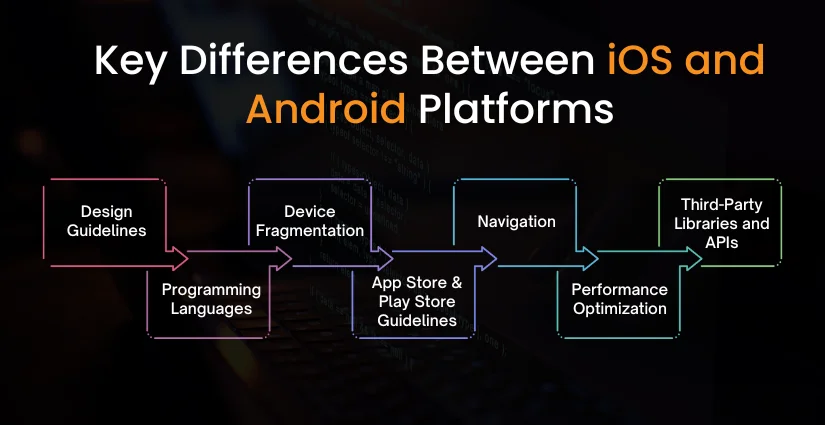
1. Design Guidelines
- iOS works on the Apple Human Interface Guidelines (HIG), investigating depth, clarity, and simplicity. The important design elements are tab bars, hardly any shadows, and consistency throughout the interface.
- Android works on Google’s Material Design principles with a big focus on bright colours, animations, shadows, and flexible layouts. It uses floating action buttons (FABs), different screen densities, and high customizability.
What It Means: You cannot just enrich your iOS UI/UX for Android. It needs to be redesigned for the Android users’ expectations of their platform.
2. Programming Languages
- Applications for iOS are built primarily with Swift or Objective-C.
- Android applications are built with Kotlin or Java.
What It Means: Reusing the code directly is difficult. The business logic has to be recoded into Kotlin/Java for Android.
3. Device Fragmentation
- iOS is a limited number of devices (iPhone, iPad) with standardised screen sizes and resolutions.
- Android comes in a wide gamut of devices (Samsung, Xiaomi, Google Pixel, etc.) and consequently screen sizes, OS versions, and hardware specs.
What It Means: Extensive testing on multiple devices is required to be done for Android apps to ensure consistency and performance.
4. App Store & Play Store Guidelines
- The Apple App Store tends to have the strictest review policies, variable approval times, and enforces strict compliance to the UI/UX.
- Google Play Store tends to offer faster reviews, is clear in being developer-friendly, and allows you to iterate quickly after the app is released.
What It Means: Platform-specific changes may be required while submitting to Google.
5. Navigation
- iOS usually entails tab bars and a back gesture from the edge.
- Android would commonly comprise drawer navigation along with bottom navigation and hardware/software back buttons.
What It Means: You would want to consider another alternative for navigation to provide an Android native experience.
6. Performance Optimization
- Memory management, background processing, and battery optimisation differ by platform.
What It Means: Some features may need to be optimised or redesigned for Android’s architecture and constraints.
7. Third-Party Libraries and APIs
- Certain libraries on the iOS side may not have counterparts on Android and vice versa.
What It Means: You need to find an Android counterpart among available libraries or implement your own if none is available.
Smart Planning: Checklist Before You Convert iOS to Android
Convert iOS app to Android isn’t just a technical task—it’s a strategic process that requires careful evaluation and preparation. Before jumping into development, use this checklist to ensure your app is ready for a seamless transition:
1. Analyze the Existing iOS App Architecture
- Review your app’s overall architecture, including backend, frontend, and third-party integrations.
- Identify which components can be reused and which need complete rework for Android.
Why it matters: A well-documented architecture helps developers map iOS functionalities to Android efficiently.
2. Define Goals for the Android Version
- What’s the objective of converting the app? (Wider reach, monetisation, feature parity, etc.)
- Will it be a full-featured replica or a lighter version with Android-specific features?
Why it matters: Clear goals guide design, development, and budget decisions.
3. Audit App Features and User Flows
- List all iOS features and determine which ones are platform-dependent.
- Analyze how the user navigates the app and how these flows can be adapted for Android UI patterns.
Why it matters: Some features may need redesign or reimplementation based on Android guidelines.
4. Evaluate Reusable Assets
- Check which parts of the codebase (e.g., API integrations, database logic) can be reused.
- Reuse assets like images, icons, content, and backend services (if platform-independent).
Why it matters: Leveraging reusable assets can save time and reduce costs.
5. Review Third-party Libraries and Tools
- Identify iOS-specific SDKs or libraries and find Android-compatible alternatives.
- Ensure APIs used in the iOS version work well in the Android ecosystem.
Why it matters: Compatibility issues can affect app performance and delay timelines.
6. Update Design Assets for Android
- Prepare design assets that follow Material Design principles.
- Export assets in appropriate resolutions and formats for the diverse Android device range.
Why it matters: Design adaptation ensures the app feels native to Android users.
7. Plan Testing Across Android Devices
- List the target Android devices (phones, tablets, etc.) and OS versions.
- Prepare test cases and plan for real-device testing using emulators or device labs.
Why it matters: Testing for fragmentation is crucial to ensure a smooth user experience.
8. Set a Realistic Timeline and Budget
- Break down the project into milestones and estimate time and resources for each.
- Consider extra time for design adaptation, testing, and app store deployment.
Why it matters: Helps avoid surprises and ensures your team stays on track.
Step-by-Step Process to Convert iOS App to Android
Transitioning or convert iOS app to Android involves more than simply replicating features—it’s about building a platform-optimized experience. Here’s a streamlined process to guide your app conversion journey:
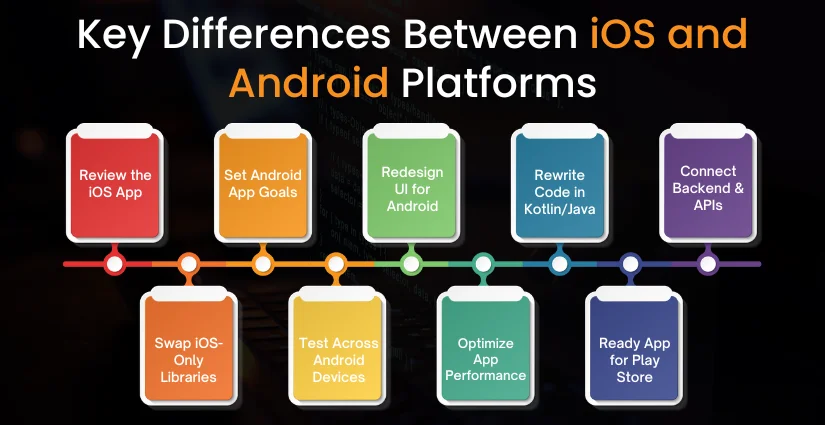
Review the iOS App
Begin by understanding your app’s architecture, features, and dependencies. Evaluate which components can be reused and which need Android-specific handling. A comprehensive analysis ensures smoother planning and execution.
Set Android App Goals
Clarify whether your Android app will mirror the iOS version or include platform-specific features. Set clear expectations for design, functionality, and performance. This helps align goals with development resources.
Redesign UI for Android
Android apps follow Material Design principles, unlike Apple’s Human Interface Guidelines. Rework the interface to ensure a native Android feel, adapting layouts, fonts, and navigational elements. The goal is to maintain familiarity for Android users.
Rewrite Code in Kotlin/Java
Since iOS uses Swift/Objective-C, you’ll need to rebuild the app using Android-friendly languages like Kotlin or Java. While backend logic can often be reused, the frontend must be recreated from scratch. This ensures compatibility and performance.
Connect Backend & APIs
Ensure that APIs used in the iOS version are compatible with Android. Backend integration must support seamless data flow, user authentication, and real-time updates. This step guarantees consistency across platforms.
Swap iOS-Only Libraries
Not all third-party tools are cross-platform. Identify iOS-specific SDKs and find suitable Android alternatives or build custom modules. Doing this ensures your Android version retains the same core capabilities.
Test Across Android Devices
Test the app across multiple Android devices, screen sizes, and OS versions to identify UI glitches, bugs, or performance issues. Given Android’s device fragmentation, thorough QA is critical for a stable release.
Optimize App Performance
Android handles background processes, memory, and battery differently than iOS. Fine-tune the app for efficient performance, ensuring it runs smoothly across all supported devices. This leads to a better user experience and reviews.
Ready App for Play Store
Create a compelling Play Store listing with optimized descriptions, visuals, and tags. Follow Google’s publishing guidelines and privacy requirements. A well-optimised store presence enhances discoverability and trust.

Common Challenges in Porting iOS Apps to Android
Convert iOS app to Android isn’t always smooth sailing. While the goal is to maintain core functionality and UX, developers often face several platform-specific challenges that can impact performance, usability, and timelines.
1. Code Reusability Limitations
iOS apps are typically built in Swift or Objective-C, while Android uses Kotlin or Java. This means direct code reuse is impossible. Hire iOS app developers who must rewrite most of the codebase from scratch.
2. UI/UX Differences Between Platforms
Apple follows Human Interface Guidelines, while Android adheres to Material Design. UI elements, layout structures, and navigation flows differ significantly. A direct copy-paste of the design won’t offer a native Android experience.
3. Device and OS Fragmentation
Unlike iOS, Android runs on a wide variety of devices with different screen sizes, resolutions, and OS versions. Ensuring compatibility and smooth performance across all of them requires extensive testing and optimization.
4. Feature Incompatibility
Some iOS-specific features (like Face ID, Haptic Touch, or iCloud integration) may not have a direct equivalent in Android. These features either need to be re-engineered or replaced with alternatives, which can impact timelines.
5. Library and SDK Substitution
Third-party libraries and SDKs used in iOS apps may not be available or supported on Android. Hire Android app developers who must identify equivalent Android-compatible tools or custom-build certain functionalities, adding to the workload.
6. Performance Optimization
Memory management, background task handling, and UI rendering work differently on Android. Without proper optimization, the Android version might lag or drain battery faster compared to its iOS counterpart.
7. Testing Complexity
Due to Android’s device fragmentation, QA teams must test the app on various devices, screen sizes, and hardware capabilities. This increases the time and cost of quality assurance compared to iOS testing.
8. Google Play vs. App Store Requirements
While Google Play has faster app approval processes, it has its own compliance standards, such as permissions, policies, and security requirements. Hire mobile application developers who need to adapt the app to meet Android publishing norms.
Cost to Convert iOS App to Android
The iOS app development cost depends on factors like app complexity, features, and design adaptation. Here’s a breakdown to help you estimate your budget effectively
| App Complexity | Estimated Cost | Estimated Timeframe | What’s Included |
| Simple App(basic features, no backend) | $8,000 – $15,000 | 3 – 5 weeks | Basic UI, limited screens, no API complexity, minimal animations |
| Moderate App(APIs, database, moderate UI) | $15,000 – $30,000 | 5 – 8 weeks | API integrations, backend support, moderate screen flow, custom UI |
| Complex App(real-time features, payments, advanced UI) | $30,000 – $60,000+ | 8 – 12+ weeks | Advanced logic, payment gateways, animations, third-party SDKs, real-time chat, admin panel |
Key Factors That Affect Cost
Below mentioned are some key factors that affect the mobile app development cost. Let’s have a look:
- UI/UX Redesign: Rebuilding the interface for Material Design standards
- Code Rewrite: Translating Swift/Objective-C to Kotlin or Java
- Feature Adaptation: Customizing or replacing iOS-only functionalities
- Device Testing: Ensuring performance across multiple Android devices and OS versions
- Third-party Integration: Replacing or reconfiguring SDKs and APIs for Android
Best Practices for a Successful Conversion
To ensure your iOS-to-Android app conversion is smooth, efficient, and results in a high-quality Android app, following industry best practices is crucial. These steps will help you avoid common pitfalls and deliver a consistent cross-platform experience:
1. Don’t Copy—Adapt the Experience
Avoid simply replicating the iOS interface. Android users expect navigation patterns and UI behaviour aligned with Material Design. Reimagine the UX for Android rather than mirroring the iOS version pixel by pixel.
2. Reuse What You Can, Wisely
While frontend code isn’t reusable, backend components, APIs, and business logic often are. Reusing validated architecture saves time and reduces errors, but ensure they are fully compatible with Android.
3. Replace Platform-Specific Features
Identify iOS-exclusive features (e.g., Face ID, iCloud) and replace them with Android equivalents (e.g., Google Sign-In, Google Drive). Ensure each platform’s native strengths are fully utilized.
4. Conduct Cross-Platform Consistency Checks
Ensure feature parity across iOS and Android to provide a uniform user experience. While the interface may differ, the functionality and flow should remain consistent.
5. Prioritize Testing on Real Devices
Android’s fragmentation means one app may perform differently across devices. Test extensively on real devices covering multiple screen sizes, resolutions, and OS versions to ensure stability.
6. Optimize for Performance and Battery Usage
What works well on iOS might not be efficient on Android. Optimize resource usage, background tasks, and UI rendering to prevent lag and excessive battery drain.
7. Follow Google Play Guidelines
Ensure your app complies with Google Play’s policies on permissions, data privacy, and UI behavior. This avoids rejection or post-launch compliance issues.
8. Use Native Android Components
Use Android-native tools, SDKs, and UI elements instead of trying to mimic iOS design. This creates a smoother, more intuitive experience for Android users and improves system compatibility.
Top Tools and Technologies for App Conversion
| Tool / Technology | Purpose |
| Android Studio | Official IDE for Android app development services |
| Kotlin | Modern programming language for Android apps |
| Java | Widely used language for Android (legacy support) |
| Material Design | Google’s design system for building intuitive Android interfaces |
| Firebase | Backend services including authentication, analytics, and database |
| Retrofit / Volley | Networking libraries for seamless API communication |
| Glide / Picasso | Efficient image loading and caching libraries |
| Room | Local database solution for Android (SQLite wrapper) |
| Junit / Espresso | Testing frameworks for unit and UI testing in Android |
| Git / GitHub / Bitbucket | Version control and collaboration tools |
| Figma / Adobe XD / Sketch | UI/UX design tools for interface planning and prototyping |
When Not to Convert: Important Considerations
While expanding an app to Android presents massive opportunities, that is not necessarily the next step to take. There are a few occasions when conversion might not give a good return or just unnecessarily complicate things. Here are some instances where delaying might be the better option:
1. Limited Target Audience on Android
Suppose your application is servicing a niche group that predominantly uses iOS, such as wealthy individuals in particular regions (like the U.S. or Western Europe). In that case, chances are this Android expansion will fail to bring value in proportion or engagement.
2. Budget or Resource Constraints
Conversion isn’t cheap and requires resources and time. If there is no budget available to preside over high-quality development, testing, and post-launch support, launching a raggedy Android version could be a brand-repelling move.
3. Android Ecosystem Has Limitations
Some compelling apps would rely on features that are quite Apple apps to android (HealthKit, iCloud, ARKit, Face ID, etc.). Replicating them on Android might be technically beyond angry or require greatly compromising.
4. Unsustainable Maintenance
Managing and updating two separate apps (iOS and Android) doubles your workload. If your team is small or lacks the resources for ongoing support, bugs and user complaints on one platform can quickly affect your overall brand.
5. User Retention or Good Product-Market Fit
If the iOS app has yet to prove its product-market fit, then the risk is too high to develop on another platform. You want to first validate your application’s value, retention, and monetization strategies on iOS before you move on to Android.
The Concluding Remarks
Entering Android’s realm from having built iOS applications is a very strategic thing to do in order to expand user base, visibility, and ROI. But it is not just about code porting. It must be created for the new platform with its design norms, user expectations, and technical challenges.
By following a structured conversion process and accommodating the peculiarities of each platform, enthusiasts can provide an uninterrupted transition while keeping the brand intact for the delivery of an original experience to Android users.
From analysing architecture, redefining UI, to testing and deployment, a well-refined set of activities demands crafting and skills along with a concrete strategy.
How Can Octal IT Solution Help?
Octal IT Solution specializes in cross-platform mobile app development and platform migration. Whether you want to migrate iOS app to Android or just want to develop a rich app from scratch, we assure you that our experienced developers will ensure:
- Platform-specific optimizations to provide a native look and feel
- Strategy for maximising the reuse of code and assets to save time and costs
- Rigorous QA testing on many different Android devices
- Full agile project management for time-to-market acceleration
- Post-launch support and maintenance
Octal IT Solution is the best mobile software development company with 18 years of mobile app expertise and 1,500+ successful projects. We help businesses make smooth transitions and tap into the massive Android market with confidence.
Read More : Top Android app development companies



 Get in Touch
 By
By September 23, 2026