



Summary
- App performance speed affects how long people stay. It also affects rankings and income later on.
- Start by checking what the device is doing. Look at CPU use, RAM use, network behavior, and how steady the frames are.
- When performance issues show, you can trace them. Think about ANRs, RAM leaks, and stutter. Catching them early can prevent user complaints.
- Use strong and right testing tools to measure results. That is better than guessing during fixes.
- Stick to known Android performance tips. That helps your app stay quick on many phones, different Android versions, and after updates.
Introduction
Why do some Android apps open instantly and feel effortless, while others hesitate, hang, or kill the battery fast? Most of the time, it is not random. It is about how the app is built and tuned.
The worldwide market for mobile apps is around $371.7 billion in 2026. It is expected to grow to about $1.39 trillion by 2034, with an 18% CAGR (ResearchAndMarkets).
With numbers like that, you cannot treat speed as a quick patch. In such a competitive market, app feel matters every day. Users keep the apps that run well. They delete the apps that stumble.
This post looks at the real reasons Android apps slow down. It also shows a clear way to check performance. Then it lists 12 practical tips for 2026 to cut lag and raise speed.
Why Android App Performance and Speed Matter in 2026
- When an app is slow to open, users back out fast. One failed start is often enough for them to move on.
- Google Play watches a set of signals. It looks at crash count and ANR count. It also checks how soon screens show up. If the wait feels long, the app loses reach.
- As time goes on, apps that run slow usually get fewer new installs. They often earn weaker star ratings too. Support groups then handle more complaints. Later, that means more effort and higher cost for fixes and day-to-day Android tasks.
- There are about 3.9 billion Android users worldwide (StatCounter, 2026). With so many phones out there, small issues can turn into lots of one-star reviews.
Common Android App Performance Issues
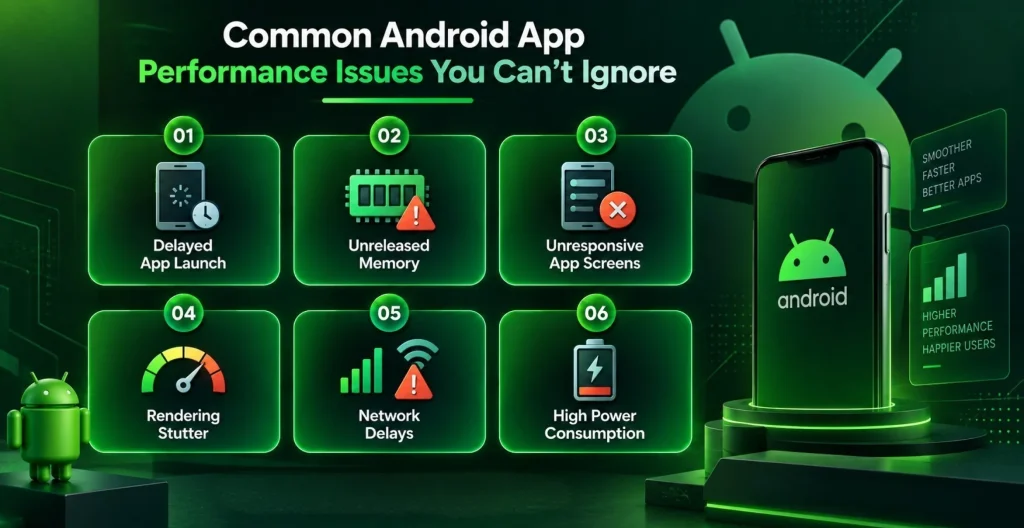
Android app slowdowns do not usually show all at once. Users then hit lag, sudden crashes, or long waits before the app opens. If you catch the problems early, you avoid churn and keep your visibility stable.
1. Slow Launch Time
Often comes from setup work that runs too early. It can also use blocking calls. Sometimes it is just extra background work happening before the first screen. That combination delays the first load and hurts retention.
2. Memory Leaks
Show when old screens are gone but their objects stay in memory. This can happen with activities or fragments that still hold references. The app uses more and more RAM. After a while, it feels heavier and can lead to crashes if you do not fix it with Android memory tuning.
3. ANRs (Application Not Responding)
Happen when the main thread gets stuck. Long tasks on the UI thread freeze the screen. The app looks dead until the work finishes or the system ends it. This harms the feel of the app, and users lose confidence fast.
4. Dropped Frames
Because of visible stuttering during animations. You may notice this during scrolling or transitions. The cause is often too much drawing work. It can also come from layouts that are too heavy or from overdraw. Cleaning this up makes the UI smoother.
5. Network Bottlenecks
Come from unoptimized API calls that were not tuned. Missing caching adds extra waits. Large responses also cost time to download and parse. With better Android network optimization tuning, the app loads faster and the experience stays steadier on different connections.
6. Battery Drain
Usually comes from work that runs in the background too often. Wake locks can also keep the device active. Poor scheduling wastes power. If you manage background work well, you cut power use. The overall app quality also improves.
Key Metrics to Evaluate Android App Performance
Get a baseline first. You cannot improve what you do not measure. Start with these checks.
1. CPU Usage
- When the CPU stays high, the device causes overheating. It also drains the battery and makes the app speed slow.
- Usually the problem is background work, loops that never end well, or heavy calculations.
- If you lower CPU load, the app tends to feel steady. It also reacts faster on Android.
2. Frames Per Second (FPS)
- Aim for a steady 60 FPS (frames per second) for smooth motion.
- If frames drop, you see a hitch. That makes the app feel rough, even if the screen looks fine.
- Frame drops often come from too many views. They can also come from drawing the same pixels again and again.
3. Memory Consumption and Management
- Poor memory work often leads to crashes. It also causes slowdowns.
- The OS ends apps that use too much memory, and this hits hard on low-end phones.
- Good memory tuning helps stop leaks. It also keeps speed more even for long use.
4. Network Performance
- Network quality affects how quickly data shows and how fast sync runs.
- If requests are not set up well, loading gets slower. The app also feels less responsive.
- Network work should be part of each release plan. It should not be treated like a one-time task.
5. Threading, Scheduling & Background Processes
- If you block the main thread, the UI hangs. That can trigger ANR.
- Use WorkManager and JobScheduler for deferred background tasks. Avoid rolling your own threads for these cases.
- On Android 12 and newer, foreground service rules matter for long jobs.
- Efficient scheduling reduces clashes with what the user is doing right now.
Tools to Test and Monitor Android App Performance
Guesswork doesn’t scale. These are common Android tools teams use for speed and stability tests in 2026.
| Tool | What It Measures | Best For |
| Android Profiler | CPU, memory, network, and energy usage in real time | In-IDE debugging during development |
| Systrace / Perfetto | System-wide traces, frame rendering, thread activity | Diagnosing jank and frame drops |
| Firebase Performance Monitoring | Real-world app performance across live users | Production monitoring and trend tracking |
| Macrobenchmark / Baseline Profiles | Startup time, jank, and code-path performance | Benchmarking before and after optimization |
Run checks often, not just before a release. If you do, the app has a better chance to stay quick. If you skip them, new updates can quietly add extra work and cause slowdowns.
Top Tips to Improve Android App Performance and Speed
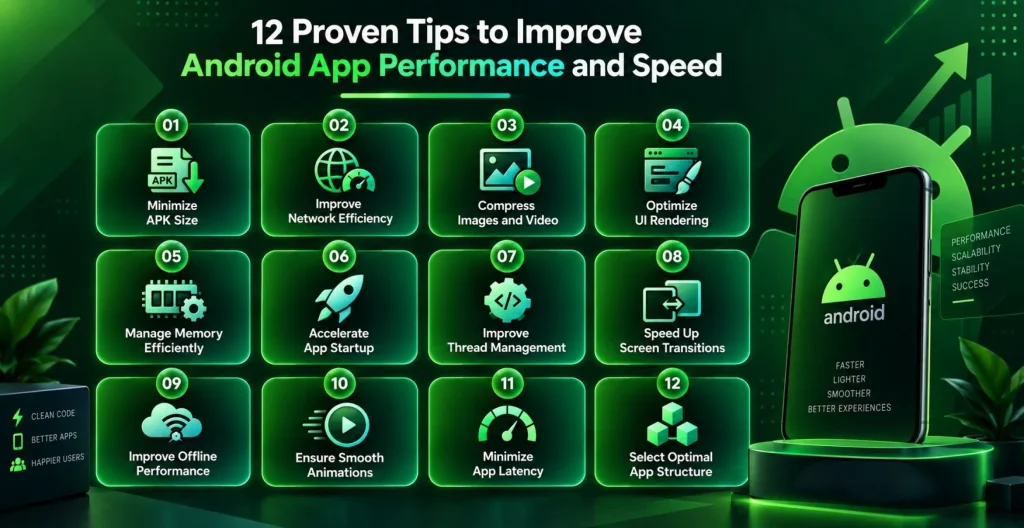
Here are 12 practical tips for Android teams. They reflect what many groups use today, including Baseline Profiles, Kotlin coroutines, and recent changes in how Jetpack Compose renders UI.
1. Reduce the App Size
- Use Android App Bundles so Google Play delivers only what each device needs.
- Utilize Android Studio Size Analyzer to find unused items, repeated assets, and large dependencies.
- Turn on R8 or ProGuard to shrink the build and strip extra code details.
- A smaller install usually loads faster and can run with less overhead.
2. Optimize Networking and API Calls
- Save results so the app does not call the same API again when data has not changed.
- Send smaller data by using compression and paging instead of pulling it all at once.
- Use reliable network tools, set time limits, and retry carefully when calls fail.
3. Optimize Images and Video
- Use images that match the needed size, not full-resolution files.
- Switch to lighter formats like WebP or AVIF to use less memory.
- Load media only when it is required, so the first screen shows faster.
4. Optimize Screen Size and Layout Rendering
- Use layouts that adapt to screen sizes and pixel density.
- Keep the view tree shallow to avoid repeated layout work.
- If you use Jetpack Compose, watch how often UI recomposes and stop extra redraws.
5. Improve Memory Usage and Resource Management
- Clear unused objects fast and do not keep old references to screens that are gone.
- Use lifecycle-aware pieces so cleanup runs at the right time.
- Check memory trends over days so leaks are found before they crash the app.
6. Speed Up App Launch Time
- Do only the needed startup to only what’s essential for the first screen.
- Hold off analytics, sync in the background, and other nonessential services until after launch.
- Add baseline profiles to pre-build key code paths and reduce cold start time.
7. Work Efficiently with Threads
- Run database work, file access, and network calls off the main thread
- Prefer Kotlin coroutines or WorkManager instead of handmade threads
- Keep UI updates on the main thread, and move heavy work to background dispatchers
8. Reduce Loading Time Across Screens
- Load the key bits before you move screens, if you can.
- Pull other data only when it is needed.
- Do less work right as the screen changes, so the switch feels quick.
9. Optimize Offline Mode
- When the network comes back, sync in the background.
- Protect private data on the device without slowing things down too much.
- Store less in preferences and reduce reads and writes to disk.
10. Maintain Smooth Frame Rates
- Use simple animations and skip extra UI effects.
- Cut down on overdraw and keep the screens flat when you can.
- Try animations on older phones, not only top-tier models.
11. Reduce Latency and Response Time
- Keep a local copy of data to avoid extra trips over the network.
- Tune network calls so the wait feels shorter.
- Give quick feedback as the user acts, so it always feels alive.
12. Choose the Right App Architecture
- MVC can be clean, but it often struggles as the app grows.
- MVP helps with Android app performance testing by keeping roles clear.
- MVVM is the common pick in 2026, and it fits well with Jetpack Compose and lifecycle-aware parts.
Read More: Best Practices for Developing High-Performance Blockchain Apps
Quick Reference: Optimization Tips at a Glance
| Tip | Impact Area | Effort Level |
| Reduce App Size | Install rate, launch speed | Medium |
| Optimize Networking | Load time, reliability | Medium |
| Optimize Images/Video | Memory, rendering | Low |
| Optimize Layout Rendering | UI responsiveness | Medium |
| Improve Memory Management | Stability, crashes | High |
| Speed Up App Launch | First impression, retention | Medium |
| Work Efficiently with Threads | Freezes, ANRs | High |
| Reduce Screen Loading Time | Navigation speed | Low |
| Optimize Offline Mode | Reliability | Medium |
| Maintain Frame Rates | Perceived smoothness | Medium |
| Reduce Latency | Interaction speed | Medium |
| Choose the Right Architecture | Long-term scalability | High |
Why These Tips Matter
- When these changes work together, you often see faster load times and smoother use.
- Android testing keeps showing the same gains as the app gets bigger over time.
- Improving Android app speed issues at the start helps limit future spending, and the app stays easier to scale.
- AI can also help track app behavior and spot slow spots with profiling and monitoring.
How Much Does It Cost to Optimize Android App Performance in 2026?
Android app optimization cost depends on how big the app is and how much work is needed in the code. It also depends on how many areas you want to improve, like startup time, memory use, or UI smoothness.
Many teams plan for ongoing work each year. Common benchmarks place that effort at about 15% to 20% of the first Android app development cost every year. That includes both tuning and routine maintenance. Because of this, the spend is easier to plan than a single one-time project.
| Optimization Scope | What’s Included | Typical Cost Range | Timeline |
| Performance Audit & Diagnostics | Profiling, bottleneck identification, and benchmarking report using Android Profiler/Firebase | $500 – $3,000 | 3–7 days |
| Targeted Fixes | Resolving specific issues—ANRs, memory leaks, slow launch, or dropped frames | $1,000 – $8,000 | 1–3 weeks |
| Full App Optimization | App size, memory, network, UI rendering, and architecture review combined | $5,000 – $25,000+ | 3–8 weeks |
| Ongoing Performance Monitoring | Continuous profiling, crash/ANR tracking, monthly performance reporting | $500 – $2,500/month | Ongoing |
| Enterprise-Scale Optimization | Multi-module apps, large user base, device-lab testing across OS versions | $25,000 – $75,000+ | 2–4 months |
Key factors for Android app speed optimization cost:
- App complexity and codebase size: big and old code often takes longer to review, measure, and fix.
- Supported devices and Android OS versions: more variety means more testing and more device checks.
- Existing technical debt: if performance was not handled from the start, fixes later take more time.
- Monitoring scope: a one-time audit can be cheaper than steady production tracking.
- In-house team vs. agency: working with a strong Android app team can cost less over time than training and maintaining a new internal group.
How Do Professional Android App Development Services Help?
Professional Android app development services extend beyond writing code. It adds a clear plan for performance from early choices in the app design. It also covers tougher areas, like blockchain work and software used by companies.
- Professionals build Android apps with speed and steady behavior from the start. This helps teams avoid painful fixes after release. It also reduces churn when the app grows.
- For Web3 or blockchain apps, how fast transactions land matters. Reliability also shapes trust. Because of that, a Web3 development company uses stricter performance checks. They adjust those checks for decentralized systems.
- When a business brings in Android developers who know how to tune apps, users usually see quicker screens. There is less guesswork. Teams also avoid the extra bill that comes from chasing slowdowns late.
- A trustworthy custom Android app development company can share tools that many teams never set up internally. They often use repeatable profiling steps and test on real phones. That check is hard to match with a small in-house setup
- These ideas carry over to enterprise work too. A CRM software development company can tune internal apps for the same feel people expect elsewhere. That means quick response times and solid load behavior.
Final Word
Improving Android app speed performance is not a one-time project. It continues after the app launches. You do it because it shows up for both users and the company. When you reduce the app size, manage memory well, remove slow network tasks, and set up the app in a careful way, things feel faster and calmer.
If you follow Android performance steps, test again and again, and learn from how people use the app day to day, the app can keep running well as more load comes in. You need to hire Android developers to ensure you build speed into the work from the start. Then you avoid extra reworking later. It also helps keep user confidence steady.


 Get in Touch
 By
By September 23, 2026