



So what’s the challenge? The traditional app development often involves long development cycles, heavy coding requirement’s and constant back and forth between the designers and developers. On the other hand, it slows down the innovation and makes it harder to adapt quickly to user feedback.
Enter Webflow, which is a platform that blends design freedom with the power of no-code development. On the other hand, it enables the teams to design, build, and launch functional, responsive web apps without waiting months for production. It starts from sleek client portals to the dynamic marketplaces, Webflow is becoming the go-to solution for those who want speed without sacrificing creativity or quality.
With the help of this guide, you’ll go through everything that you need to know about Webflow app development so you can go from the idea to launch faster, smarter, and with full creative control.
What Is Webflow App Development?
The webflow app development refers to the process of creating fully functional, interactive, and responsive web applications by using Webflow’s visual design and development platform.
On the other hand, Webflow is widely known for the website creation, and it can also be extended into app development by combining its powerful CMS (Content Management System), custom animations, and third-party integrations.
Like the other traditional coding environments, Webflow helps in providing a no-code or low-code interface that helps to allows designers and businesses to:
- It is visually designed and developed in one place
- Manage the dynamic data through its CMS
- Implement custom code when needed for advanced functionalities
- Integrate with tools like Memberstack, Zapier, Firebase, and Stripe to add user authentication, payments, and automation
With the help of this approach, users can enable faster prototyping, more design freedom, and the ability to launch apps that are both visually stunning and highly functional without the steep learning curve of traditional programming.
Webflow App Development Market Outlook 2025 & Beyond
The following statistics highlight Webflow’s market position, adoption trends, and business impact worldwide:
- Webflow powers about 0.9% of all websites globally, with a 1.2% share among CMS platforms.
- 47.96% of Webflow’s total 1,028,363 historical sites are live, equating to about 493,226 active websites.
- Approximately 1.5% of top-ranked (top 1 million) websites use Webflow.
- Webflow-based e-commerce stores reached 15,286 live stores in Q2 2025, representing an 11% year-over-year increase and a 0.5% growth compared to the previous quarter.

Why Choose Webflow for App Development?
In today’s digital world, where speed, flexibility, and scalability are able to determine digital success, web development services are evolving rapidly. This is the stage where Webflow for app development has positioned itself as the powerful choice for the process of building a modern web application. Below are the points that show why it stands out:
No Code/Low Code Flexibility
Webflow app development helps in bridging the gap between design and development. You can easily build your app without writing a single line of code, yet still add custom scripts when advanced functionality is needed. This flexibility makes the team that wants full creative control without the deep technical overhead.
Faster Prototyping
Traditional app development can take weeks or months before you have the functional prototype. With the help of professional webflow app development, you can design and deploy interactive prototypes within a few days. For this reason, this rapid turnaround helps in validating ideas, gathering feedback, and iterating quickly.
Custom Integrations
It needs more features beyond Webflow’s native capabilities. The platform helps to support the seamless integration with the APIs and third-party tools. For instance, Memberstack for authentication, Stripe for payments, Zapier for automation, and Firebase for the backend service that allows you to build the complete functionalities without reinventing the wheel.
Responsive Design
Webflow is built with responsiveness at its core. Every design can automatically adapt to mobile, tablet, and desktop devices by ensuring a consistent user experience across all screens without manual CSS tweaks.
Scalable CMS Features
With the help of the CMS, users can easily manage the large volumes of dynamic content, blogs, product listings, directories, events, and without touching a single database query. You can structure the collections that are suitable for your needs by making it easier to grow and update your app over time.
Also Read: Web App Development Cost: A Detailed Guide
Types of Apps You Can Build with Webflow
Webflow app development supports the development of various types of apps, from landing pages to elaborate membership systems and full-fledged e-commerce applications. It is flexible enough to accommodate startups and small work-for-hire projects as well as enterprise-level projects.
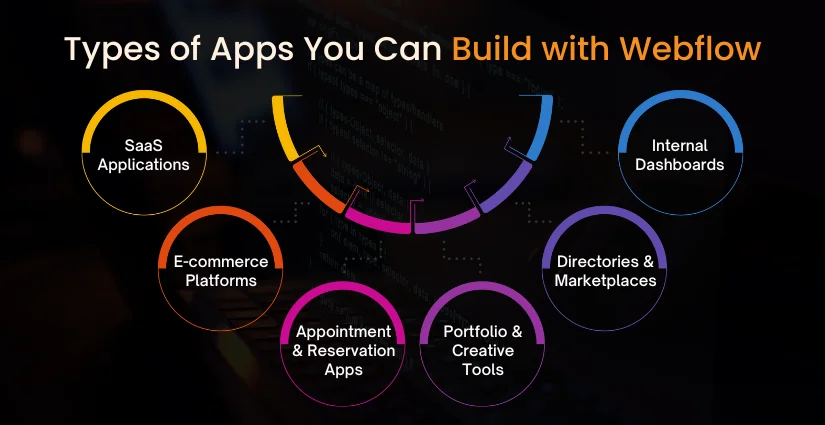
1. SaaS Applications
Webflow can serve as the sleek, user-friendly front end for your SaaS development services. Whether it’s a project management tool, a fitness tracking app, or an AI-based productivity platform, you can design fully branded interfaces and connect them to robust back-end systems via APIs. This allows you to roll out updates quickly and provide a seamless, subscription-based experience without being locked into rigid templates.
2. E-commerce Platforms
Beyond just setting up a standard online store, professional webflow app development empowers you to craft a shopping experience that matches your brand’s personality. On the contrary, the pages for products could be customized by users to design unique checkout flows and integrate with a payment gateway that would assure their security. Meanwhile, having added automation for inventory management and order tracking would make it possible to provide a swift, personalized, and frictionless buying experience to customers.
3. Appointment & Reservation Apps
If your business is in appointments, events, rentals, and reservations, Webflow will help you build an intuitive booking platform. You can integrate with your scheduling tool to surface real-time availability, manage cancellations, send reminders, and collect payments all from one place. The result is a less stressful experience for both the customer and the service provider.
4. Portfolio & Creative Tools
Webflow is favored by designers, photographers, and agencies for creating lively and visually appealing portfolios. Its CMS features allow updates of work samples, case studies, and testimonials all without the need for coding. You can add interactive galleries, animations, and filters to allure visitors while showcasing your work in the best possible manner.
5. Directories & Marketplaces
So, you want a platform where buyers and sellers, or service providers and clients, interact? With Webflow, you can create directories with search and filtering capabilities or multi-vendor marketplaces. You can couple it with some backend mobile web design services to handle listings, process transactions, and accept user-generated content, making it a wonderful resource for niche communities and local businesses.
6. Internal Dashboards
Webflow is not limited to customer-facing apps; it can also be used for internal tools. Imagine a dashboard that pulls real-time data from CRMs, analytic platforms, or inventory systems. Your designs and access control can be tailored to allow your team to view metrics, manage tasks, and collaborate efficiently in a branded environment safely.
Read More: Future of Web Design and Development: Trends for 2025
Webflow App Development Workflow
A professional webflow app development process proceeds from planning and wireframing through design, implementation, and integration of functionality, testing, and launching. Strict adherence to a workflow would guarantee that the app satisfies both the look-and-feel and functional requirements.
Planning & Wireframing
Being the very first step, figuring out your app’s purpose, target audience, and key features needs full attention. Either wireframe or prototype every single of the baby steps: structure, user flow, core interactions, and from there, design.
Setting Up Webflow CMS
The CMS collections have to be configured so that dynamic data of your app can be worked on: user profiles, product listings, blog posts, event details, on so on.
Designing UI/UX
Design a nice-and-easy-use-type interface by using Webflow tools. The navigation should be smooth; branding should be consistent; and the layout should function well across different device types with ui ux solutions.
Add Functionalities
Animating and interacting through native Webflow interactions and animations should breathe life into your kind of app, and these can go from hover effects to smooth scrolling down to modal windows and dynamic transitions of elements.
Custom Coding
Utilize JavaScript and CSS, or third-party scripts for those more complicated functionalities not provided by Webflow itself, such as custom filtering, form validation, and chatbots.
Testing & Optimization
Test your app on several devices and browsers for any bugs or inconsistencies. Ensure its performance, accessibility, and loading speeds are so optimized that others have no clue when they encounter it.
Launching the App
Publish your app through Webflow’s hosting or connect a custom domain. Ensure all integrations, tracking codes, and SEO settings are configured before going live.
Key Features to Implement in Your Webflow App
Responsive layouts, user authentication, and engaging animations are some core features that can make an app more useful. Depending on who your audience is and what the primary purpose of your app is, you will need suitable features.
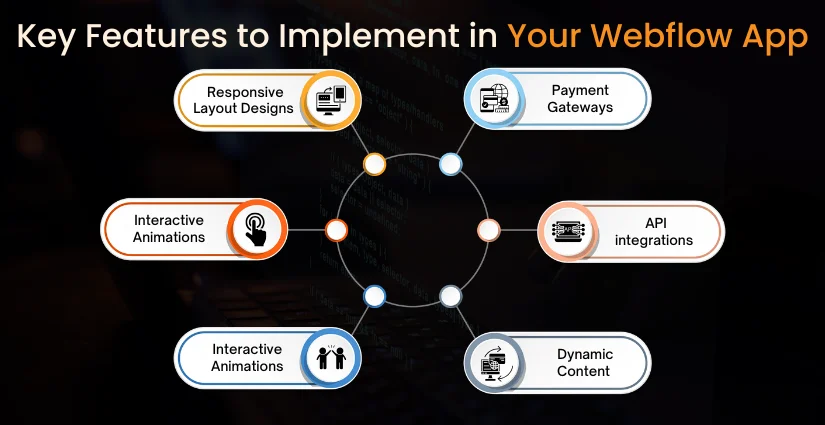
1. Responsive Layout Designs
The app will automatically adjust according to the screen it is viewed on to offer consistent experiences on a desktop, tablet, or smartphone.
2. Interactive Animations and Transitions
Micro-interactions, page transitions, and animations create an enhanced engagement with the feel of smooth navigation.
3. User Authentication
Secure login, signup, and account management, by choosing one of the platforms that exist, such as Memberstack, Outseta, or Firebase, which take care of role-based access and personalization.
4. Payment Gateways
Depending upon the area of operation, integrate payment options, such as Stripe, PayPal, or Razorpay, to facilitate secure and easy payments.
5. API integrations
The app integrates with third-party services to augment features- for instance, fetching social media feeds, syncing with CRMs, or enabling real-time updates.
6. Dynamic Content
The CMS handles content management to keep the app fresh. This capability enables a non-technical person to update listings, articles, or portfolios.
7. SEO Optimization
Enhance visibility by using webflow app development settings for SEO, specifying meta tags, evaluating alt text, defining structured data, and guaranteeing fast page load speeds.
Tools & Integrations for Webflow Apps
Webflow supports various third-party payment, automation, analytics, and search tools. These tools, when integrated, extend your app beyond the Webflow native feature set.
| Category | Tool | Purpose |
| E-commerce & Payments | Stripe, PayPal | Online payments & checkout |
| CMS & Database | Webflow CMS, Airtable | Content & data management |
| Automation | Zapier, Make | Workflow automation |
| Analytics & Tracking | Google Analytics, Hotjar | User behavior insights |
| Forms & Lead Capture | Typeform, HubSpot Forms | Collect and manage leads |
| Search & Filters | Jetboost, Algolia | Real-time search & filtering |
| Membership | Memberstack, Outseta | User login & gated content |
| Custom Code & APIs | Webhooks, JavaScript | Advanced features & integrations |
Cost of Webflow App Development
Webflow app development costs vary based on complexity and design, and integrations. Long-term success depends on webflow app development pricing for initial development plus maintenance.
| Stage | Estimated Cost Range |
| Planning & Wireframing | $500 – $1,500 |
| UI/UX Design | $1,000 – $3,000 |
| Development & CMS Setup | $2,000 – $6,000 |
| Custom Code & Integrations | $1,000 – $4,000 |
| Testing & Optimization | $500 – $2,000 |
| Deployment & Launch | $300 – $1,000 |
| Ongoing Maintenance | $500 – $2,000 per month |
Pros & Cons of Using Webflow for App Development
Webflow may speed prototyping and provide scalability in a no-code environment; yet, there are issues with backend utilizations. Weighing these pros and cons may help on whether it fits the bill for your project.
| Pros | Cons |
| No-code/low-code platform, easy for non-developers | Limited backend functionality compared to custom webflow app development |
| Fast prototyping and launch | Complex apps may require external tools or custom webflow app development code |
| Responsive design built in | Not ideal for highly data-intensive apps |
| Integrates with numerous third-party services | Subscription costs can increase with advanced features |
| Scalable CMS for dynamic content | Performance can depend on external integrations |
| Visually intuitive design interface | Limited offline capabilities |
Future of Webflow in App Development
Besides that, it is expected that from now on, it will have greater integrations with the backend services, thus giving developers the ability to build more complex apps without leaving the Webflow ecosystem. Changes will come to the CMS and API of Webflow to make it easy to work with dynamic data, while no-code plugins and third-party tools will continue to expand possibilities-from real-time collaboration and advanced e-commerce features to AI-powered experiences.
Responsive design is a must these days, and cross-platform is in high demand; therefore, Webflow, which has an intuitive UI combined with the ability to add custom webflow app development code, becomes the tool to go to for both startups and established companies. The installation of no-code/low-code initiatives across various industries points toward Webflow being a key instrument in the democratization process for app creation, enabling the non-technical to breathe life into their concepts faster than ever before.
In short, the future of Webflow in app development looks promising, leaning toward faster workflows, smarter integrations, and limitless creative possibilities.

The Concluding Remarks
Webflow has shifted how apps can be conceptualized, designed, and deployed breaking through the age-old barriers between designers and developers. This no-code approach, combined with the option to custom webflow app development code, serves speed and scalability.
Whether a slick SaaS product, an interactive booking system, or a data-driven marketplace, Webflow has everything one would need to realize a vision without compromising on either performance or beauty.
A build-up in no-code will only make Webflow bigger-and thus a must-have for companies that want to build fast without compromising on quality.
At Octal IT Solution, we help businesses harness this tool and build beautiful and performance-oriented web applications tailored to their purposes. The implementation covers from the strategy to UI/UX design, from implementation of advanced features to deployment of the app, ensuring that your Webflow project will exceed expectations, both in looks and productivity.

 By
By June 22, 2026



 Get in Touch