



The launch of a company’s new application is an event of immense grandeur: great designs, the best performance, and different UX. A few months later, the sets of important user information were brought to light by a data breach, and with that, customer trust was shaken, and the reputation of the brand seemed at stake. The cause: One overlooked security loophole.
In a digital-first environment, cybercriminals essentially treat web applications as banks. And from the start-up phase to the level of grand multinational, no business entity has been left safe. With increasing sophistication in attacks, web development security best practices have become a matter of necessity.
This blog walks you through some of the best 10 web application security practices that every business should implement so that it can protect its digital assets, customer data, and trust.
An Overview of Web Application Security Practices
Web applications, being the backbone of modern enterprises, are utilised for many things, from engaging customers, online sales, conducting internal operations, or collaborating with partners. Whether you are running a SaaS platform, an eCommerce storefront, or customer portals, web apps are central to it all. With increasing digital dependence and the evolving future of website design development, comes the increased vulnerability to security threats.
Cybercriminals are continuously evolving their methods against vulnerabilities to steal sensitive information and disrupt services so they can hold businesses to ransom. Recent studies reveal that almost 43% of the attacks end up targeting small to medium-scale businesses that are least prepared for such incursions.
The fallouts can be dire: huge financial losses, reputational damages, losing clients, and getting fined for lack of compliance with laws such as GDPR, HIPAA, or PCI-DSS.
Security in today’s world is not a feature that is added after development, but something that must accompany web development from the get-go. Businesses need to embrace security-mindedness and weave it into practices that are incorporated into each stage of their web application development security best practices lifecycle.
In this write-up, we have outlined the top 10 web application security best practices that every organisation, regardless of size or industry that should implement. For this reason, these web development security best practices will not only assist in defending against the evolving cyber threats but also foster the long-term user trust, business continuity and regulatory compliance.
Market & Threat Landscape Statistics 2025
- Global application security market estimated to reach $16.61 billion in 2025 from $13.62 billion in 2024, with an expected staggering growth rate of 21.9% year on year due to increased attacks and demand for DevSecOps integrations.
- The global application security market is forecasted to burgeon to $41.8 billion by 2029, at a CAGR of 26% during 2025-29.
- With a CAGR of 14.2%, the US application security market is expected to reach $39.32 billion by 2029 from nearly $19.89 billion in 2025.
- The value of the general cybersecurity market is expected to be $301.9 billion in 2025 and is all projected to reach $878.5 billion in 2034, maintaining a steady CAGR of 12.6%.
- Web application attacks are ranked the second most prevalent attack vector, accounting for 26% of all breaches. On average, websites are subject to nearly 94 attacks per day.
Must-Follow Web App Security Best Practices for 2025
To build a secure and trustworthy web application, businesses must adopt industry-proven practices that help prevent cyberattacks. Whether you’re securing a website or exploring mobile app security tips, following these guidelines is essential. Here are the top 10 web development security best practices to follow:
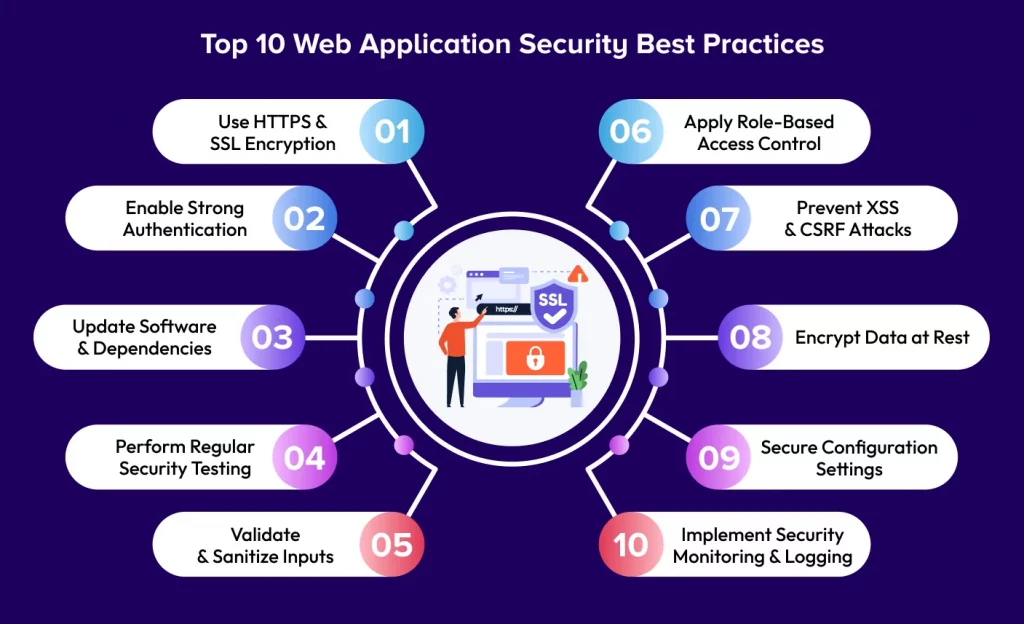
Use HTTPS & SSL Encryption
Every web application must ensure protection by using HTTPS and not HTTP for communication. HTTPS uses SSL/TLS certificates to encrypt the data being transmitted between the user’s browser and the server in order to avoid a Man in the Middle (MITM) attack, such as when an attacker captures sensitive information like login credentials, payment information, or session cookies.
Best Practices:
- Ensure that your SSL certificates are acquired from trusted Certificate Authorities (CAs).
- Apply 301 redirect from all HTTP traffic to HTTPS.
- Renew certificates on time and stay on top of your certificates to avert service interruption.”
Enable Strong Authentication
Weak authentication may open up access for brute-force attacks. Use Multi-factor Authentication (MFA) to secure web applications and authentication processes beyond just usernames and passwords.
Best Practices:
- Ensure that the password policy is enforced (minimum length, complexity, expiry).
- Have token-based session-based authentications (e.g., JWT) coupled with Secure, HttpOnly, and SameSite cookies.
- Have session time-outs and automatic logouts based on inactivity.
Example: Banks and finance apps use SMS OTP or biometrics-based authentication as a second factor.

Update Software & Dependencies
Using an old framework, plugin, or library is a typical source of vulnerability. Most famous web development tools keep on issuing patches correcting for newly discovered threats.
Best Practices:
- Maintain a list of all open-source and third-party components.
- Subscribe to web security best practices bulletins related to your tech stack.
- Use tools such as Dependabot or Snyk to scan dependencies and get automatic update alerts.
Example: Not updating a vulnerable jQuery or WordPress plugin can expose the entire app to known exploits.
Perform Regular Security Testing
Security is preventive and includes proactive testing through static code analysis, an automated DAST tool, and penetration testing. These practices are essential components of robust website development services, ensuring that applications are built with security at their core.
Best Practices:
- Testing is to be conducted at the time of major secure website development stages and after each update.
- Scanning for vulnerabilities using OWASP ZAP, Burp Suite, and Nikto.
- For deeper, unbiased evaluations, hire ethical hacking teams from third parties.
Bonus Tip: DevSecOps practice integration in your CI/CD pipeline.
Validate & Sanitize Inputs
Any input from users can be a potential threat if left unvalidated. These inputs have to be checked more thoroughly when it comes to forms, search bars, and upload fields. Improper handling of inputs can end up with attacks such as SQL Injection, XSS, or even command injection.
Best Practices:
- Validate on the server-side all inputs (client-side validation is never enough).
- Use parameterised queries (prepared statements) rather than raw SQL queries.
- Sanitise HTML input to eliminate malicious tags and scripts.
Example: Login Form-Based Injection Attack: The input, which is not sanitized may pass something in the username field, authorising users by bypassing authentication with ‘ OR ‘1’=’1.
Apply Role-Based Access Control
Not just anybody would be allowed to access any area of your web security applications. RBAC helps define roles and assign specific privileges based on job functions.
Best Practices:
- Grant the minimum level of privileges necessary (Principle of Least Privilege).
- Separate user roles like admin, editor, viewer, etc.
- Avoid hardcoding roles or permissions; instead, create a configuration to manage them.
Example: In a CRM system, only managers should be allowed to delete leads, while sales reps should have read/write access only.
Prevent XSS & CSRF Attacks
Cross-Site Scripting (XSS): Injection of malicious scripts that steal users’ sessions and cookies, or instead deface the site.
Cross-Site Request Forgery (CSRF): The attacker tricks the victim into doing something on a web application in which the user is already authenticated.
Best Practices:
- Use Content-Security-Policy headers to block untrusted scripts.
- Encode all output to protect against script injection.
- Use a CSRF token for any state-changing requests (form submissions, updates).
- Avoid inline JavaScript code and loading external resources without restriction.
Example: Without any protection against CSRF attacks, a malicious email could cause a logged-in user to transfer funds without really meaning to do so. Since attacks like this often start with a spoofed email, pairing CSRF protection with email authentication — checked with a DMARC Checker — closes the gap before it reaches the user.
Encrypt Data at Rest
Not all threats come from outside. An internal breach, if it occurs, can compromise data; therefore, encrypting data at rest would prove to be helpful to keep stolen data unreadable without keys.
Best Practices:
- Use AES-256 or any other comparable encryption for sensitive fields (PII, credit card data).
- Store password hashes with salted hashing algorithms such as bcrypt or Argon2.
- Keep encryption keys secure in key management systems (KMS), and avoid keeping them in code.
Example: Database compromise won’t do any good to attackers if encrypted data is in place and they do not have the keys, a critical reminder when following essential website development tips for securing your application
Secure Configuration Settings
Default settings may also contain developer-friendly options like verbose error messages, debug modes, or default credentials and all of these, if exploited, can become potentials.
Best Practices:
- Disable services, ports, and modules that are not required in a production environment.
- Disable the debug mode and remove any test data or sample page.
- Use environment variables to hold secrets and API keys rather than hardcoding any of them.
Example: Leaving the default admin credentials unchanged in CMS platforms, such as WordPress, is an easy target.
Implement Security Monitoring & Logging
Having logs is just one part of the story. Actively looking at the logs will help you detect a breach swiftly and allow you to respond. Monitoring will help you identify suspicious activities, unusual login behaviors, or repeated failed access attempts.
Best Practices:
- Log information about user activity, failed login attempts, data access, and system errors.
- Employ centralized logging mechanisms (like ELK Stack or Splunk).
- Integrate your logging system with SIEM tools to get real-time alerts and detect anomalies.
- Have a well-defined incident response plan for breaches.
Example: An alert can be triggered if a user account is used from multiple countries in a short time, giving a hint towards credential theft.
Estimated Cost Breakdown for Web Application Security in 2025
Understanding the website development cost in Dubai is essential for budgeting and planning secure digital solutions. Below is a breakdown of estimated costs in 2025, covering key security practices required to safeguard your application from evolving cyber threats.
| Security Practice | Estimated Cost Range (USD) |
| SSL Certificate & HTTPS Setup | $50 – $300/year |
| Multi-Factor Authentication (MFA) | $500 – $3,000+ (one-time) |
| Security Testing & Penetration Testing | $1,000 – $20,000+ |
| Vulnerability Scanning Tools | Free – $5,000/year |
| Code Review & Secure SDLC Implementation | $5,000 – $25,000+ |
| Web Application Firewall (WAF) | $20 – $1,000/month |
| Data Encryption at Rest & In Transit | $2,000 – $10,000+ |
| Security Monitoring & Logging (SIEM tools) | $2,000 – $15,000/year |
| Security Configuration & Hardening | $1,000 – $7,500 |
| Compliance & Regulatory Audits | $10,000 – $100,000+ |
The Final Remarks
In an era of increasing data breaches and cyberattacks, web application security best practices are not just a technical concern-it’s a business imperative. By following these web development security best practices, organisations can create digital products that are resilient, trusted, and aligned with global standards.
Security is never something that is accomplished in one day; it is an ongoing process. From the beginning of an application’s concept to deployment and further, working with security in mind will safeguard your users, your brand, and your bank account, while also influencing your overall web app development cost.
Read More : Best Progressive Web App Development Companies
How Octal IT Solution Can Assist?
Octal IT Solution is a different entity specialised in secure, scalable, and performance-driven web applications tailored for your business. The lifecycle of our development considers security from the very start of the architecture planning to the final phase of deployment.
Here’s how we create web app security best practices:
- Secure coding standards and adherence to OWASP Top 10 practices
- Regular vulnerability scanning and code reviews
- Role-based access control and data encryption implementations
- End-to-end security consulting and post-launch support
- Setting up SSL certificates and firewalls and monitoring tools.
Be it developing a new app or improving the existing one, the well-oiled expert team of Octal maintains that web development security best practices are never an afterthought; it is embedded in its foundation.


 Get in Touch
 By
By June 22, 2026