


Desktop applications are returning to the trends as a large portion of tech enthusiasts have started to choose them over mobile or web applications. When it comes to delivering an exceptional user experience or providing secure operations, businesses turn to desktop app development.
The rising demand for desktop applications is that they help businesses succeed by providing efficient operations, preventing data breaches and cyber-attacks, and ensuring rapid growth.
If you are planning to acquire desktop app development services, you have come to the right place! We have provided a complete desktop app development guide comprising different types, features, benefits, step-by-step processes, and added costs. Let’s jump right into details:
What is a Desktop Application?
A desktop application is a software program run on a computer such as a PC or laptop. Users can install the software directly on their devices. These work differently from any other application as they don’t require an active internet connection.
Desktop apps run on operating systems such as Linux, macOS, and Microsoft Windows. They can be accessed via the GUI or a terminal window, as you can quickly double-click the program icon on the main window screen.
Desktop app developers use Java, C++, C#, or Python programming languages to create platform-specific applications. These apps can deliver a smooth and responsive experience, and you can use them to provide the best performance even when they are offline.
Some of the popular examples of desktop applications are: Microsoft Office, Skype, Adobe Photoshop, Discord, Slack, Illustrator, etc.
Market Size and Growth of Desktop Applications
Businesses are continuously realizing the importance of cross-platform desktop app development; hence, the market has become a promising investment sector. Get to know the current market share and growth of the desktop app market:
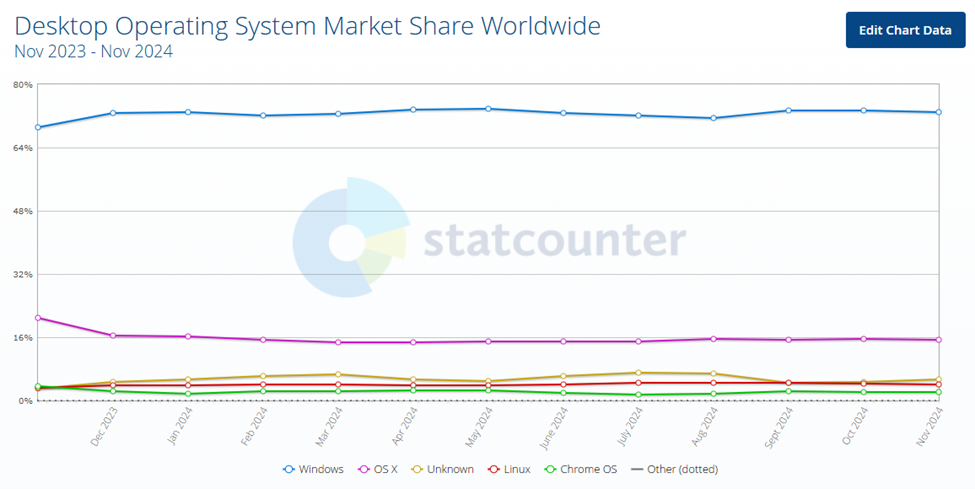
- Let’s look at the global desktop operating system market share via this representation. By November 2024, Windows had a 72.94% market share, followed by OS X (15.38%), Linux (4.04%), Chrome (2.24%), and others (0.01).
- The global Linux operating system market size was valued at USD 18.35 billion in 2023. It is forecasted to grow from USD 21.97 billion in 2024 to USD 99.69 billion by 2032 at a 20.8% CAGR.
- Moreover, the Linux operating system market is projected to rise significantly, reaching an estimated value of USD 25,261.3 million by 2032, thanks to advanced data centers, higher internet speeds, and the adoption of cloud computing technologies.
- In the graph below, we can see that Windows 10 had the largest market share of 61.83% by November 2024. It was followed by Win11 (34.94%), Win7 (2.47%), Win8.1 (0.31%), WinXP (0.25%), Win8 (0.16%), and others.
- Desktop-as-a-service market revenue globally is valued at US$ 4.72 billion in 2024.
- Considering the global market, the USA will generate most of the revenue, rising to US$2041 million in 2024.
Read More: 15 Best Frontend Frameworks for Web Development
Top Reasons Why Should Businesses Choose Desktop Applications
Our bespoke desktop applications provide numerous benefits, ensuring they match different business requirements. Here, we will get to know about the potential advantages of desktop application development that are:
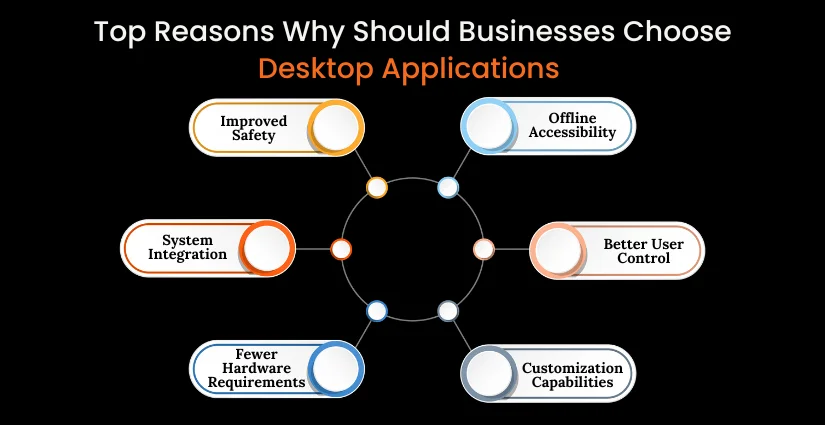
Improved Safety
Desktop apps are the most secure compared to mobile and web apps. These can be accessed offline, leading to restricted exposure to third-party threats. Desktop app experts have complete control over encryption, regular updates, and access controls to alleviate the risk of privacy breaches. Thus, desktop app development is the best choice for enterprises when security is a concern.
Offline Accessibility
In desktop apps, you don’t need to worry about losing employees’ work or wasting time as these also work even in a slow or no internet connection. They work as independent apps while ensuring incessant productivity, proving it to be the best choice for ventures or professionals who work in domains with unstable internet connection.
System Integration
It is one of the most useful benefits of desktop applications that guarantee uninterrupted communication between the app and other software & hardware elements. It enables users for app integration with peripherals, file systems, and system APIs to enhance overall functionality of system and provide an augmented user experience.
Better User Control
Users have complete control of desktop apps as these are not run by any remote server. Businesses can customize them as per the requirements. These apps also utilize the native competencies of the operating system, leading to delivering a seamless user experience. Compared to other apps, desktop apps are easier to manage, develop, and modify.
Fewer Hardware Requirements
Desktop apps are independent and unlike other online apps, they don’t depend on web browsers. Hence, they occupy less storage and memory space compared to a mobile or web app. Moreover, desktop applications can easily streamline the processes by using local resources, ensuring smooth performance, quicker response times, and reduces latency.
Customization Capabilities
Businesses can customize desktop apps to ensure businesses get bespoke solutions. Customizations including functionality, UI, software integration, etc. can be done based on specific business needs. Ventures can also get tailored layouts and designs to provide users a flexible environment.
Also Read: Top 25+ Android App Development Companies in USA
Explain the Difference: Desktop Apps vs Mobile Apps vs Web Apps
Still skeptical about what to choose among desktop apps vs mobile apps vs web apps? Check out the below comparison table to see the key differences and select the one according to your specific requirements:
| Aspect | Desktop Apps | Mobile Apps | Web Apps |
| Platform | Needs specific OS to run (Linux, Windows, macOS) | Runs on mobile platforms (Android, iOS) | Accesses through web browsers on any device |
| Performance | High performance; use of device resources | Created for mobile devices, may have offline features | Based on internet speed, restricted by browser capabilities |
| Required Connectivity | Works offline | May work offline if it has this feature | Requires internet connectivity for almost functions |
| Security | Follows local & OS-level security measures | Secure following app store guidelines | Follows HTTPs, authentication, & backend security |
| Installation | Requires downloading & Installation | Requires downloading & Installation from app stores | No installation, accessed through URLs |
| Use Cases | Graphic design, video editing, productivity tools, gaming | Social media, navigation, messaging, lightweight utilities | eCommerce, content-oriented apps, blogs, dashboards |
| Examples | Adobe photoshop, Microsoft Word, AutoCAD | Instagram, WhatsApp, Spotify | Trello, Google Docs |
How to Develop a Desktop Application? A Step-by-Step Process
Developing a desktop app can be stimulating during the process; hence, it is essential to hire expert programmers. You can also leverage the best frameworks, programming languages, and tools for custom desktop app development. To know about how to build a desktop app, keep scrolling:
1. Conceptualize the Project Idea
The starting phase includes determining necessary aspects like project goals, features, target audience, and other requirements. This step will require the collaboration of consultants, developers, stakeholders, etc., to discuss project goals, user expectations, costs, timeline, and system integrations.
Clearly defined project requirements will help the development team create a solution within the decided timeline and budget.
2. Desktop App Designing
You can choose various designing tools, such as Mockplus, Adobe XD, Moqups, etc., to create desktop and mobile app wireframes. The wireframe will provide the client with an idea of the app’s layout, look, and functions. After getting approval on it, work on the final design will start. Consider designing a responsive, visually appealing, and intuitive desktop app with seamless flaws and easy navigation.
3. Choose Suitable Framework & Language
Your developers must be aware of the significance of selecting the best desktop app development frameworks and programming languages. These include the WPF toolkit, Electron JS, Cocoa, UWP, etc. You can choose from these. Also, the required programming languages are HTML/CSS, JavaScript, TypeScript, Node.JS, SQL (for Front-end), and Python, Java, C#, and C (for Back-end).
To build a desktop app from scratch, you must use these effective frameworks and programming languages to save time and money.
4. Desktop Application Development
Start coding with the help of IDE (integrated development environment) to write better, save time, and address bugs simultaneously. Some essential IDEs include Visual Studio, XCode, and so on. Before starting the custom desktop app development process, you need to look at the required features and functions.
Consider third-party services and system integrations to make the app more promising, flawless, and high-performing. Remember to implement things one by one, as executing them together can create complications.
5. Test and Deploy Your Application
Whether it is desktop or Windows mobile app development services, we conduct a robust testing process to check the app on different parameters. These include performance, usability, security, integrity, functionality, etc. After the Quality assurance procedure, we deploy the app for users.
Later, we provide our clients with post-launch support and maintenance services to continuously monitor the app, solve errors, update features, and more.
Learn More: 20 Top Emerging Technologies to Watch for Success
Technologies Required for Desktop App Development
As a large-scale business, you must consider best language for desktop app development. Alongside, leverage advanced tools and technologies to build a high-performing desktop software program.
- Programming Languages: C++, C#, Python, Swift, Java
- Desktop Frameworks: Electron JS, UWP, WPF Toolkit, Cocoa, WinForms
- Development Tools: IDEs, Version Control
- Database: SQLite, Realm, MySQL, PostgreSQL
- APIs: RESTful, GraphQL
- Packaging & Deployment: DMG/PKG Creators, InstallShield, Applmage/Snp
- Testing Frameworks: Unit Testing, UI Testing
How Much Does it Cost to Build a Desktop Application?
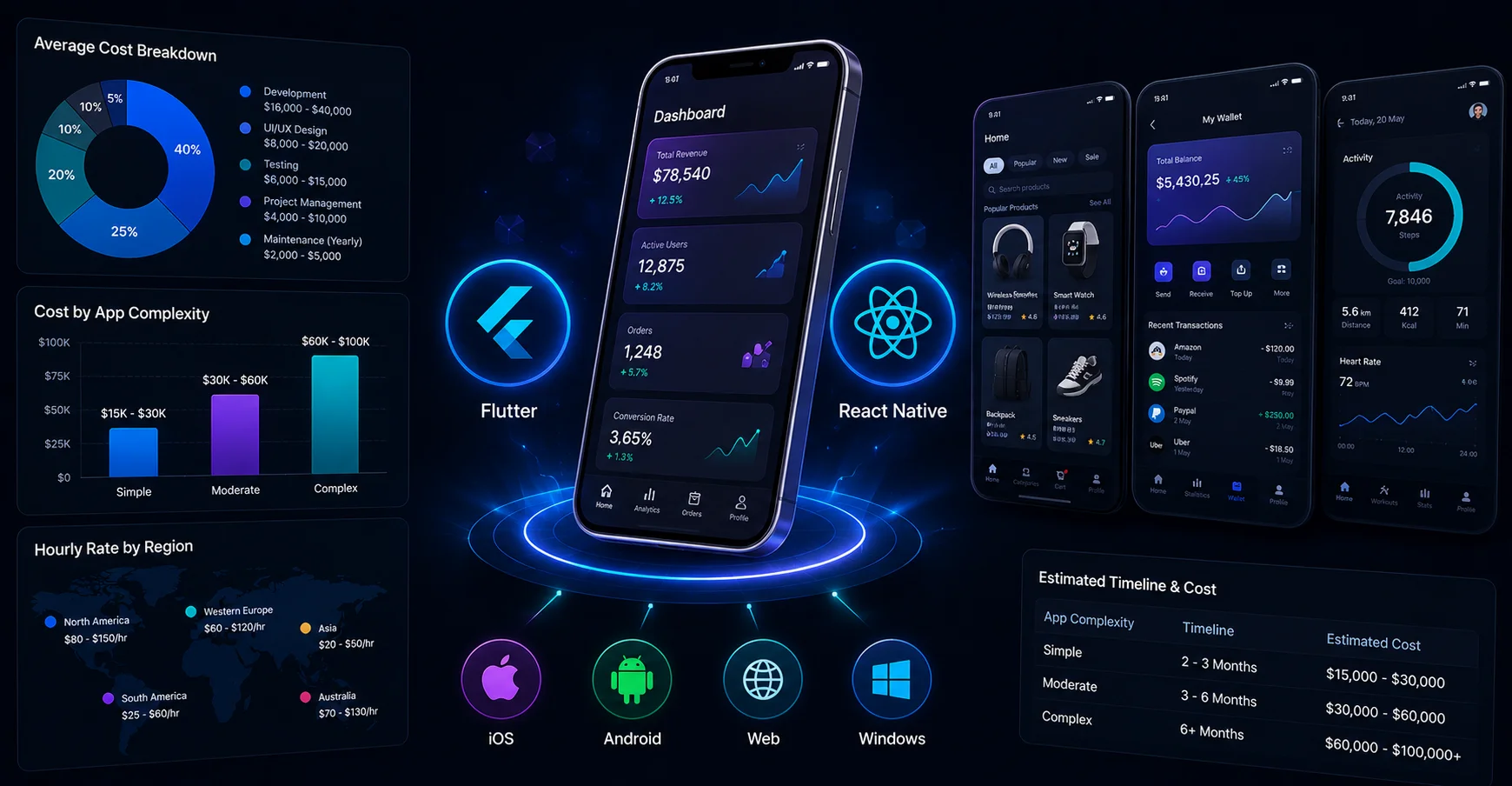
The cost of developing a desktop application depends on a wide range of factors including app type, customization, app complexity, integrations, developers’ location & resources.
To get the best cross platform desktop app development, the cost will range between $15,000 and $100,000.
If you want a basic app, the cost might be less than around $15,000 to $25,000, but to get a desktop app with multiple features, you need to spend more than $40,000.
The cost to develop an app can vary anytime due to the evolving needs of users. Alongside, there can be some extra expenses including designing, testing, tech stack, support & maintenance, etc.
Final Verdict
Desktop app development is a multi-step procedure that needs assistance from experienced professionals. Recently, desktop applications seem to be a great option to invest for businesses. By applying right development approaches and industry trends, businesses can achieve their desired solution. They just need to ensure that the app is fulfilling the actual purpose and certain requirements.
In this reference, Octal IT Solution is the best desktop app development company with a vetted team of experts emphasizing client-centric solutions. We specialize in developing Windows-based solutions leveraging advanced desktop app development tools and frameworks. You can hire dedicated cross-platform developers from us for your next project!
FAQs
Some different types of desktop apps are productivity apps, communication & collaboration apps, web browsers, utility apps, entertainment apps, and others.
Yes, desktop apps are still in demand and facilitating businesses with several advantages encompassing better performance, system resources integration, offline access, and more.
To choose a suitable operating system between Windows, Linux, or macOS, you must consider your target audience, features, market reach, community support, and others. Windows offer greet community support, Linux is best at customization, and macOS is much popular among tech enthusiasts.

 By
By September 10, 2026




 Get in Touch