




Have you ever imagined that your Flutter app is slow but you don’t know why, although you appear to have done everything right? Expert developers chase smooth animations, fast loading, and a great UI. Without clear data and best practices, performance issues can interfere with us unnoticed.
Moving on to the reasons why Flutter app performance optimization is not just preferred, but necessary, especially keeping in mind the rapid increase in the number of mobile apps in the near future.
Mobile App Market: A Skyrocketing Opportunity
According to Mordor Intelligence, the global mobile application market is projected to nearly double from USD 333.9 billion in 2025 to USD 745.4 billion by 2030, growing at a CAGR of 17.4%.

- The app development market itself is forecasted to grow from USD 265 billion in 2025 to USD 543 billion by 2030, with a 15.4% CAGR.
- Furthermore, the intelligent (AI-powered) apps segment will surge even faster, from USD 47.6 billion in 2025 to USD 211 billion by 2030, a staggering 34.5% CAGR.
The above figures clearly demonstrate the situation that is in place, the influx of new applications that are being created, deployed and downloaded by users who are expecting these applications to be fast, responsive and reliable.
Tips for Flutter App Performance Optimization
Have you ever used an app that was faltering, lagging, or taking too much time to load? Most probably, you have shut it down and never thought about it again. Nowadays, in a world moving at high speed, performance has become everything. Flutter is the favorite for developing fast and lovely apps; still, if it is not properly optimized, it can behave the same as other apps.
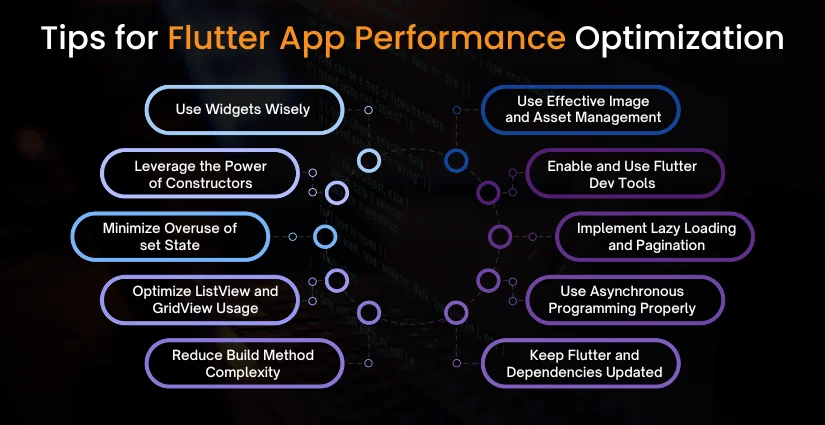
Whether you are building a minimum viable product for a startup or expanding an enterprise application, performance problems can still have a negative impact on your user retention, app store rating, and revenue. Therefore, we have created a list of 10 tips to enable your Flutter application to reach its maximum speed and power.
Let’s dive in!
Tip 1: Use Widgets Wisely
Stateless vs Stateful Widgets
In Flutter, each and every part of the system is represented by a widget; however, not all widgets have the same properties. Stateless widgets are more efficient and less complicated because of their enduring nature. Your UI will not depend on dynamic data, so use it. At the same time, stateful widgets have the capability to frequently change and reload. Apply them merely whenever it is really necessary.
Avoiding Unnecessary Widget Rebuilds
Every time a rebound takes place, there is a performance loss. Do not put too much logic in the implementation build() method. Instead, split up big widgets into small ones, and if you use keys correctly, you will avoid unnecessary updates.
Tip 2: Leverage the Power of const Constructors
How const Helps Performance
The use of the keyword const gives Flutter the information that a certain widget will not be changed. Thus, Flutter will keep the widget in memory and access it faster, which reduces the rebuilding number and boosts rendering efficiency.
Best Practices to Use const in Flutter
- Use const as much as possible, particularly for static widgets.
- Implement lint rules so that only const constructors are used.
- Even nested widgets can be marked const to gain benefits.
Tip 3: Minimize Overuse of setState()
Alternatives Like Provider, Bloc, Riverpod
setState() is simple, but if it is used too much, it can become dangerous- the whole widget is rebuilt. For bigger and more complicated apps, consider going for state management tools, Provider, Bloc, or Riverpod, which help you separate the task of managing business logic from the UI one.
State Management Best Practices
- Don’t manage all app states in one widget.
- Lift state up to where it’s truly needed.
- Choose the right state management based on your app’s scale.
Tip 4: Optimize ListView and GridView Usage
Use ListView.builder Instead of ListView
In case your application needs to display a long list of items, don’t use the normal ListView, use ListView.builder() instead. This method only loads the items that are necessary (lazy loading), thus saving memory and improving performance.
Lazy Loading for Large Lists
The process of implementing pagination or infinite scrolling to load data in parts is called lazy loading. This approach ensures that the UI remains light and responsive.
Tip 5: Reduce Build Method Complexity
Split Widgets into Smaller Components
Do not put everything in one go inside the build() method. Separating your UI into smaller reusable widgets considerably supports effective management of the rebuilds.
Move Logic Outside of Build Methods
Restraining the performance-demanding operations from build()is one good option. If you do so, you might call separate functions or controllers to handle the logic and focus build() solely on the rendering of the UI.

Tip 6: Use Effective Image and Asset Management
Compress Images Before Use
Huge images take a toll on your app’s speed. Compress images through applications like TinyPNG or with Flutter image compression packages, and let them consume less space in your app.
Use CachedNetworkImage for Remote Assets
If your app loads images from the internet, use the cached_network_image package. It caches images locally so they don’t reload every time, saving time and data.
Tip 7: Enable and Use Flutter DevTools
How to Analyze Performance with DevTools
The performance tab in Flutter DevTools will give you information about rebuilds, rendering, and memory consumption.
Key Metrics to Monitor
- Repaint boundaries
- Frame rendering time
- Memory leaks
- CPU/GPU usage
Tip 8: Implement Lazy Loading and Pagination
Techniques for Large Data Handling
Just like humans cannot perform well when overloaded with information, the computer cannot perform well if all data is loaded at the same time, which causes performance to drop significantly. On the other hand, use APIs or indexed loading techniques to fetch only what is visible on the screen.
Infinite Scroll and Data Chunking
Divide your data into small chunks or pages. When new chunks are loaded as the user scrolls, the activity seems to be faster, and the risk of a crash caused by memory overflow is eliminated.
Tip 9: Use Asynchronous Programming Properly
Avoiding UI Freezes with Future and async
Operational processes of a long time duration, like API calls or file I/O, should never hinder or block UI. The use of async/await or FutureBuilder will give you the opportunity to access them in the background.
Isolate and Compute for Heavy Tasks
In case there are tasks that require intensive calculations, employ Isolates or compute() to perform these tasks out of the main thread. Thus, the UI will be smooth, and there will be no freezing of the app.
Tip 10: Keep Flutter and Dependencies Updated
Staying Current with Flutter SDK
With each new Flutter release comes improved performance and reduced bugs. Make sure that your Flutter version is the latest in order to get these good things.
Upgrading Packages for Better Performance
Your app may be slowed down by outdated or bloated packages. Frequent checking of your pubspec.yaml file and replacing the packages with the ones that are more efficient in terms of performance or memory usage is a good practice.
Bonus Tips: Code Splitting, Preloading, and More
These bonus tips add on to the main ones to boost the performance of your Flutter app, especially when the app gets bigger.
1. Split Code with Navigator 2.0
Navigator 2.0 can be helpful with code splitting if your app has many screens or complicated navigation flows. Instead of loading the whole app, it only loads parts that are necessary at the moment. Resultantly, the initial load remains fast, and memory usage is optimized.
2. Preload Critical Data or Assets
Preloading is bringing in the very necessary data, images, or assets before the user asks for them. Say, the next screen’s content is loaded in the background while the user stays on the current screen. This leads to a smooth, no-stopping and waiting during the navigation process.
Not only downloading on-demand but also preloading will make everything fly, especially in dynamic content, animations, or large media files-heavy apps. Looking for a Flutter app development company in Dubai? Partner with experts to build fast, scalable, and high-performing mobile apps.
Common Flutter Performance Mistakes to Avoid
Hire flutter developers can be guilty of making small errors that end up with big performance problems. In addition to knowing what you should do, it is vitally important to know what you should not do.
In case your app is felt as not responsive or slow maybe you are making some typical mistakes without realizing it. Here are two common issues that may debilitate your Flutter app’s performance unnoticed.
1. Rebuilding Entire Screens Unnecessarily
When only a small part of the UI needs to change, one of the most common mistakes is rebuilding the whole screen. It leads to unnecessary pressure on the CPU, and your app will be slower. Instead, divide your UI into smaller widgets and change only those parts that really need it.
2. Ignoring Platform-Specific Optimizations
Flutter can be used on Android as well as iOS, however, you should not go to the extent of disregarding the features of the platform. Different platforms have different performance secrets, like using different image formats or animation styles. Personalizing the app experience for Android and iOS users can make the app feel smoother and more natural for users on both sides.
Avoiding these mistakes can go a long way in positively impacting the app’s performance, making it smooth and user-friendly.
Tools and Plugins for Flutter Performance Monitoring
It is no good to write clean code for a high-performance Flutter app if you do not have the right tools to watch and analyze the app’s behavior. These performance tools, such as frame rendering, memory usage, or crash tracking, are very useful to be aware of problems in a timely manner and keep your app running smoothly and fresh.
Here we go with a list of the most helpful tools and plugins Flutter developers can use.
Popular Flutter Performance Monitoring Tools
| Tool/Plugin | What It Does | Best For |
| DevTools | A built-in Flutter tool for debugging UI, tracking rebuilds, memory, and more | UI performance analysis and widget rebuilds |
| Dart Observatory | Low-level tool to inspect memory usage, CPU profiling, and isolate performance | Deep performance inspection and debugging |
| Sentry | Real-time error tracking and performance monitoring across platforms | Crash analytics and performance insights |
| Firebase Performance | Tracks app startup time, HTTP requests, slow frames, and custom traces | Overall app performance and network tracking |
Regular interaction with these resources ensures that your app stays quick, responsive, and completely ready for production all the time.
Understanding the Cost of Flutter App Development
When optimizing or creating a Flutter app, one of the initial things businesses need to look at is the Flutter app development cost. Without going into specifics, the pricing can change according to the features, design complexity, integrations, and the experience of the developer. Usually, the cost to develop a Flutter app is somewhere between $10,000 and $50,000 for basic to mid-level apps. Apps with higher complexity and real-time features or backend systems will cost even more.
The price of hiring Flutter developers largely depends on the location and proficiency of the developers. For example, it will be more economical to hire Flutter developers from regions such as Dubai, Eastern Europe, or India than from Western countries at an hourly rate of $20-$80. Working with a credible one of the top flutter app development companies gives you the best of all worlds – quality, speed, and reasonable prices.
To receive a precise quotation for your project, the most advisable way is to reveal your target with a team of professionals who can suggest a personalized budget.
Final Thoughts
With Flutter, you can easily create attractive, fast, and cross-platform apps, but in case you don’t take care of the performance tuning, even the best-designed apps may get slow or crash. That is exactly why the Flutter app performance optimization step is not only the last one, it must be considered throughout the whole Flutter app development process.
By employing 10 proven techniques, using widgets efficiently, taking advantage of const, reducing setState(), optimizing lists and images, and tracking performance with tech tools, for example, found in this blog, you can make your Flutter app run faster, smoother, and more efficiently.
Besides, you are not allowed to forget the extra tricks, such as code splitting and preloading and be careful not to repeat the mistakes that can drag your app down. According to research, between 2025 and 2030, the mobile app market is going to grow exponentially, and performance is likely to be the only factor that can help your app be unique and keep its users.
So, get going right now, always check, and keep your Flutter app lightweight, responsive, and scalable!



 Get in Touch
 By
By September 3, 2026